Use this workspace when
You have one topic, want to review the script and storyboard before spending credits, and need a 9:16 file without appearing on camera. Faceless reels with a repeatable visual system are the intended job.
Faceless reels guide
Faceless reels are short vertical videos built from narration, captions, and scene visuals rather than an on-camera host. The format removes a face from the frame. It does not remove the need for an original script, licensable media, or a hook people will actually watch.
MakeFacelessReels is a faceless reels workspace for that job. Start from an idea or script, review the spoken line and scenes, then export a 9:16 file. Signup includes 100 credits, enough for about 1-3 short videos including one 15-second Fast export.
Definition
Faceless reels can use voiceover, captions, stills, generated scenes, screen recordings, or licensed footage. Viewers still judge the first seconds, the pacing, and whether the pictures match the words. Quality is an editorial problem, not a camera problem.
The useful test is repeatability. If you can write the next ten scripts, source the visuals, and keep one visual system, the format can support a channel. If the idea only works as a one-off clip with borrowed footage, it is not a faceless reels niche yet.
Workflow
MakeFacelessReels keeps idea, script, scenes, voice, and export in one reviewable path: idea to script to scenes to voice to a 9:16 file you upload yourself.
Bring a topic, research notes, or narration. Keep one job for the video so the hook and payoff stay aligned.
Edit the opening line, timing, language, and on-screen captions before spending credits on images or motion.
Pick one visual style, one voice, and a soundtrack that supports the narration instead of competing with it.
Inspect each beat, regenerate a weak scene, generate the 9:16 file, and upload it yourself. Auto-posting is not included.
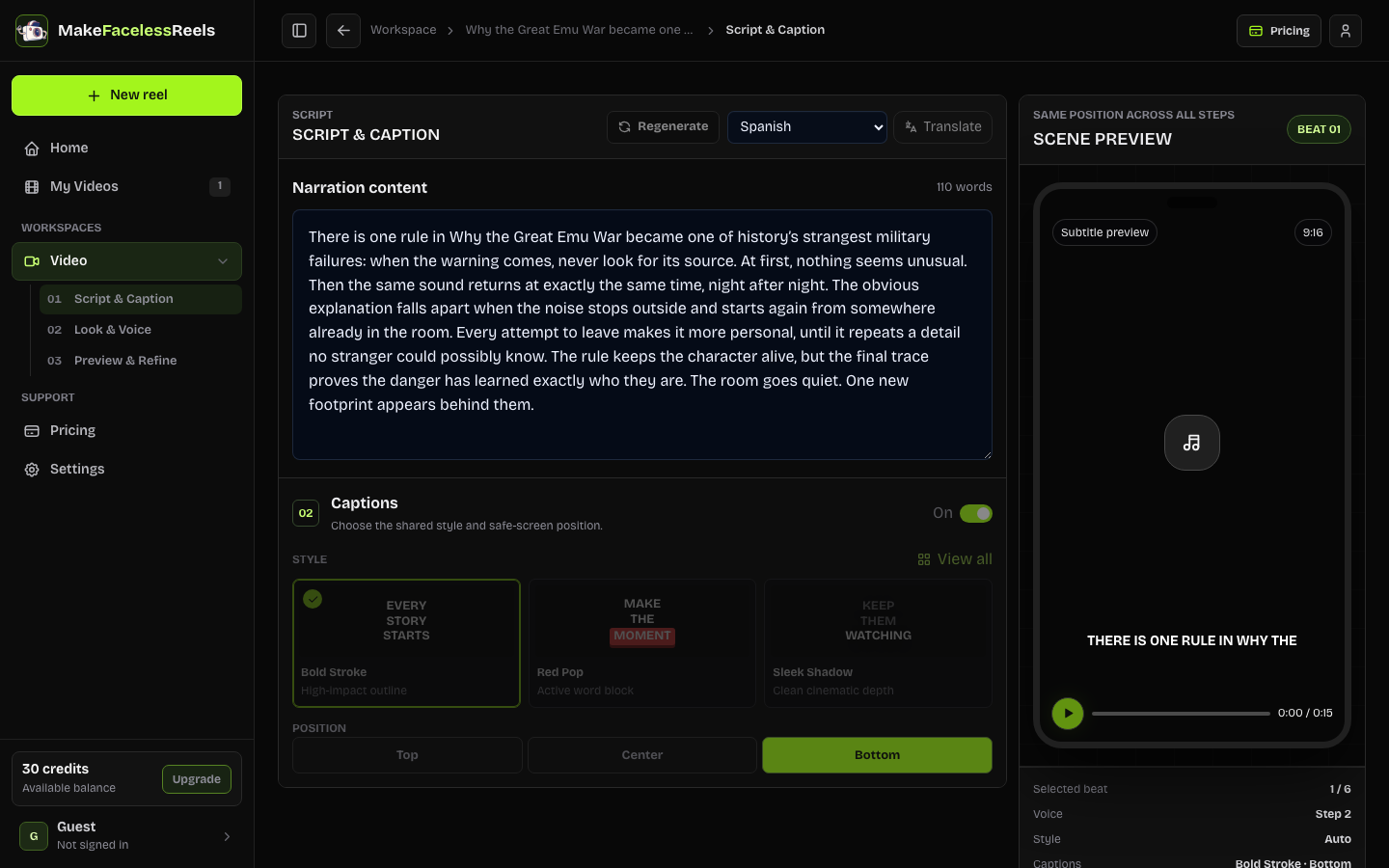
Product facts
These limits come from the current workspace, not from a generic “AI video” promise. Use them to decide whether this tool fits the next video.
| Fact | Current support |
|---|---|
| Duration | 15 seconds to 5 minutes |
| Visual styles | 17 curated looks, chosen before generation |
| Script languages | English, Spanish, Portuguese, Indonesian, Japanese, Hindi, Turkish, and Vietnamese |
| Signup credits | 100 credits, about 1-3 short videos including one 15-second Fast export |
| Publishing | Manual upload. No automatic posting to TikTok, Reels, or Shorts |
Platforms
One vertical master can travel, but the opening line, cover, and caption should change. TikTok often rewards a spoken hook in the first seconds. Instagram Reels needs a recognizable package. YouTube Shorts can hold a slightly longer explanation when the promise is clear.
Being faceless does not decide monetization. Copied clips, missing AI labels, or thin mass-produced posts can still fail eligibility. Check the current Creator Rewards, Reels, and Shorts rules for your account instead of copying a screenshot of someone else’s RPM.
Publishing limits
You remain responsible for the script, music, images, likeness, private details, and any label a platform requires for realistic AI media. MakeFacelessReels does not grant copyright clearance and does not promise views, follows, or payouts.
Fit
You have one topic, want to review the script and storyboard before spending credits, and need a 9:16 file without appearing on camera. Faceless reels with a repeatable visual system are the intended job.
Keep CapCut or a similar editor when you already have footage, need frame-level cuts, trending sounds, or a complicated composite. This product is script-first, not a replacement for timeline finishing.
Niches
These lanes already have a dedicated page. Choose one audience problem instead of posting “facts” as a generic topic. The faceless reels niches guide compares twelve directions if you are still choosing.
Timed horror drafts with a hook, rule, escalation, and aftershock.
Behavior explainers that stay non-diagnostic and reviewable.
One event, one misconception, and a source you can name.
Everyday money decisions without guaranteed-return claims.
Frequently asked questions
Faceless reels are short vertical videos that use narration, captions, and scene visuals instead of an on-camera host. They still need an original script, licensable media, and a clear hook.
Start with one idea or script, review the hook and captions, choose a visual style and voice, preview each scene, then export a 9:16 MP4 and upload it to TikTok, Instagram Reels, YouTube Shorts, or Facebook Reels.
MakeFacelessReels is a paid production workspace at makefacelessreels.com. Support is support@makefacelessreels.com, subscriptions can be canceled from Billing, and you remain responsible for rights, disclosures, and platform rules. Read the legit page for the operating details.
New accounts receive 100 credits, enough for about 1-3 short videos including one 15-second Fast export. Ongoing rendering uses a paid credit plan. Signup credits do not cover unlimited exports.
Current monthly plans are Creator $29, Pro $49, and Studio $89. Credits never expire, and yearly billing lowers the effective monthly rate. Compare the live amounts on the pricing page.
You can export one 9:16 master and adapt the opening caption, cover, and length for each app. Do not treat a watermarked cross-post as original work, and check each platform’s current rules.
No. The current release prepares a reviewable project and MP4 export. You upload the file yourself after checking captions, rights, and AI disclosure.
No. A faceless format does not grant rights to music, footage, or someone else’s script, and realistic AI media may need a platform label. Review the official TikTok, Instagram, and YouTube guidance before publishing.
Create faceless reels
Open the composer, keep one topic, and review the script before you generate. Credits are shown before a paid render, and you upload the finished file yourself.
Create faceless reelsLast reviewed . Product duration, languages, credits, and publishing boundary checked against the current workspace.