Idea or script input
Start from a topic, question, or rough script. The same composer supports idea-to-video and script-to-video, so you do not have to rewrite the source into a special prompt format.
Continue the creator workflow
Start with the input you already have
YouTube Shorts Generator
Plan a 9:16 Short from the same reviewable workflow.

AI TikTok Video Generator
Use the TikTok-specific brief when the post is for FYP.
Faceless Reels Script Generator
Write timed narration before opening a full project.

Faceless Reels Idea Generator
Compare three hooks before you generate a video.
Quick answer
An AI Faceless Video Generator turns one idea or script into a 9:16 faceless video. MakeFacelessReels drafts narration, captions, scenes, and voice, then you review and export. It does not require a camera and does not auto-post.
MakeFacelessReels creates a local draft on the AI Faceless Video Generator page. Rendering uses workspace credits. New accounts receive 100 credits. The AI Faceless Video Generator does not publish to TikTok, YouTube, or Instagram automatically.
| Input | One idea or script |
|---|---|
| Output | Reviewable 9:16 project, then an MP4 export |
| On camera | Not required |
| Auto-post | No. You upload the file yourself. |
Real workflow proof
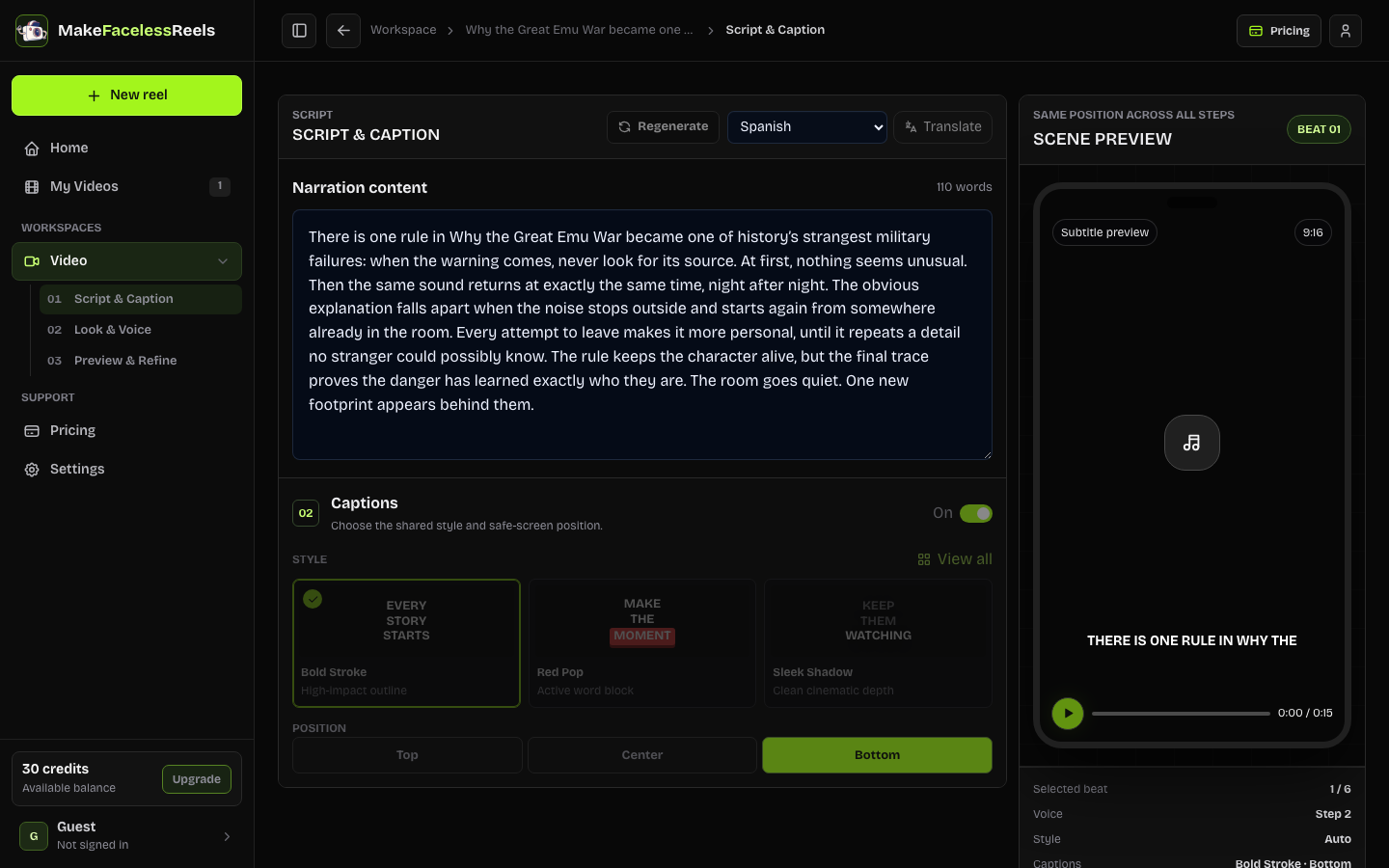
A useful AI Faceless Video Generator should return an editable project, not only a paragraph. After you create a draft, Script & Caption keeps the spoken line, captions, and scene order visible.
Core capabilities
The AI Faceless Video Generator is built for creators who want a faceless short they can inspect. It keeps the decisions that affect hook, clarity, and continuity in one workspace.
Start from a topic, question, or rough script. The same composer supports idea-to-video and script-to-video, so you do not have to rewrite the source into a special prompt format.
The AI Faceless Video Generator keeps the opening line, narration beats, captions, and scene plan visible before you spend credits on voice or motion. Cut topic drift while the draft is still cheap to edit.
Plan a vertical video with a duration, readable captions, a visual style, and a voice direction. Use the same brief for TikTok, Reels, or Shorts when the idea travels.
Move into Storyboard and Studio to lock a look, reuse a voice, and export from My Videos. Later episodes can follow the same lane without starting from a blank prompt.
Three creation steps
Give the AI Faceless Video Generator enough context for a useful first draft, then keep editorial judgment in the loop. One audience question and one payoff beat a pile of disconnected facts.
Open the AI Faceless Video Generator and describe one story, lesson, or question, or paste a rough script. Keep one subject so the draft can hold a single hook and payoff.
In the AI Faceless Video Generator, choose 15 seconds to 5 minutes. Shorter cuts force a clearer opening; longer cuts need a tighter scene plan in review.
In the AI Faceless Video Generator, open Script & Caption, then Storyboard and Studio. Edit the hook, captions, visuals, and voice before you export a 9:16 file. The tool does not auto-post.
Typical use cases
Use the AI Faceless Video Generator when the starting material can become one focused vertical story. These examples name the input, the action, and the expected output.
Paste a mechanism, history detail, or finance lesson. The generator drafts a spoken hook and scene list so each fact gets a visual job instead of a generic stock loop.
Best for: Educational faceless shorts
Start with a mystery, confession, or serialized premise. Review escalation and reveal in Script & Caption, then keep the same style for the next episode.
Best for: Story-led faceless series
Bring an original product lesson or audience question. Draft a clear CTA, then check claims and disclosures before you upload the export yourself.
Best for: Offer explainers you still review
Specs
These bounds match the current composer. If a row is not listed, do not assume the AI Faceless Video Generator supports it.
| Item | Current support | Boundary |
|---|---|---|
| Input | One idea or script | 8–5,000 characters; keep one focused topic |
| Duration | 15 seconds–5 minutes | Presets and 15-second increments |
| Format | Vertical 9:16 project | Designed for Shorts, Reels, and TikTok uploads |
| Output | Reviewable local project draft | Rendering and export depend on workspace access |
| Publishing | Manual upload | No automatic social publishing |
| Draft | Free local project | New accounts receive 100 credits |
| Paid render | Creator plan starts at $29/month | Rendering uses credits; a draft is not an MP4 |
Limits
The AI Faceless Video Generator is a production workspace, not an autopilot poster or a clipper.
The AI Faceless Video Generator does not auto-post to TikTok, YouTube, Instagram, or Facebook.
The AI Faceless Video Generator does not cut long podcasts, livestreams, or third-party videos into shorts.
The AI Faceless Video Generator uses credits for rendering and retries. A local draft is not a finished MP4.
You still check copyright, AI labels, and Creator Rewards rules before publishing a file from the AI Faceless Video Generator.
Frequently asked questions
An AI Faceless Video Generator turns a topic or script into a vertical video without asking you to appear on camera. MakeFacelessReels creates a reviewable project with narration, captions, scenes, voice, and export controls.
The AI Faceless Video Generator lets you create a local draft without paying. Rendering and export use workspace credits. New accounts receive 100 credits. The AI Faceless Video Generator does not promise unlimited free rendered videos.
No. The current workflow prepares a 9:16 project and download path. You upload the file yourself and remain responsible for rights, captions, and platform disclosures.
Enter one premise, audience question, or rough script in the AI Faceless Video Generator. Name the subject, the tension, and the takeaway. Avoid stacking unrelated ideas in a single prompt.
Yes. After the AI Faceless Video Generator creates a draft, you can reuse visual style, voice, and series settings so later videos stay in the same lane. Continuity still needs a review pass before export.
Faceless or AI-assisted videos are not automatically disqualified or automatically eligible. Originality, duration, labels, and current platform rules decide payout. Check YouTube and TikTok policy pages before publishing.
This AI Faceless Video Generator starts from an idea or script. It does not cut a long podcast, Reddit thread, or existing YouTube video into shorts.
TikTok, YouTube, and Instagram may require labels for realistic AI media made with the AI Faceless Video Generator. A disclosure is not proof that the post is original or monetizable.
Related next steps
Use the idea and script tools when the angle is still loose. Read the faceless reels hub if you need the format definition. When you are comparing tools, start with the AutoShorts alternative page, then return to the composer on this page.
Start with the idea or script you already have. The composer stays at the top of this page so you can return after reading the workflow, limits, and examples.
Create a faceless videoLast reviewed September 22, 2026 · Product flow, export boundary, and no auto-publish claim checked.