Shorts-sized input
Start from a viewer question, list, story beat, or script. The composer keeps that source attached so the Short does not drift into a second topic.
Continue the creator workflow
Start with the input you already have
Quick answer
A YouTube Shorts Generator turns one idea or script into a 9:16 video for YouTube Shorts. MakeFacelessReels drafts captions, scenes, and voice, then you review and export. It does not require a camera and does not upload to YouTube automatically.
MakeFacelessReels creates a local draft on the YouTube Shorts Generator page. Rendering uses workspace credits. New accounts receive 100 credits. The YouTube Shorts Generator does not upload to YouTube automatically.
| Input | One idea or script |
|---|---|
| Output | Reviewable 9:16 project, then an MP4 export |
| On camera | Not required |
| Auto-upload | No. You upload the file in YouTube Studio. |
Real workflow proof
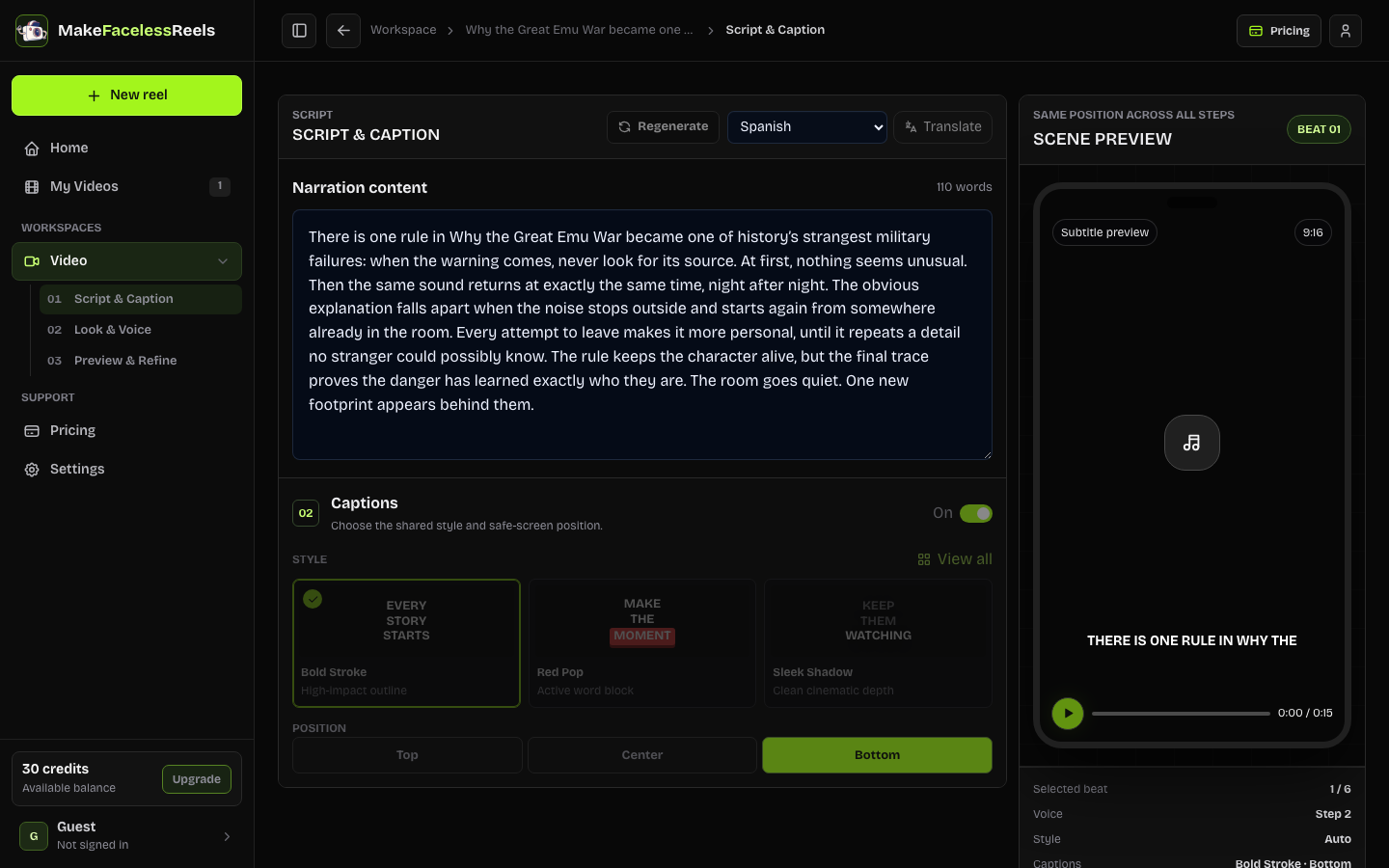
A useful YouTube Shorts Generator should return an editable project. After you create a draft, Script & Caption keeps the spoken line and captions visible so the first seconds can be tightened.
Core capabilities
The YouTube Shorts Generator uses the same reviewable workspace as other MakeFacelessReels tools, with a Shorts-specific brief: vertical export and a manual YouTube upload.
Start from a viewer question, list, story beat, or script. The composer keeps that source attached so the Short does not drift into a second topic.
The YouTube Shorts Generator shows the first line, narration, and on-screen captions before you render. That is where most Shorts are won or lost.
Plan a vertical file with a duration, captions, visual style, and voice. Upload the export in YouTube Studio with your own title, description, and tags.
Reuse look and voice across later Shorts. Continuity still needs a review pass; the generator does not invent a channel calendar for you.
Three creation steps
Keep the brief Shorts-shaped: one question, one change, one payoff. Then inspect the draft before you spend credits on a full render.
Open the YouTube Shorts Generator and name the viewer question, the twist, and the takeaway. Paste a script if you already have spoken lines.
In the YouTube Shorts Generator, choose 15 seconds to 5 minutes. YouTube Shorts discovery still favors openings under 60 seconds; longer cuts still export as 9:16 files you upload yourself.
In the YouTube Shorts Generator, check the hook, captions, scenes, and voice. Download the MP4 and upload it in YouTube Studio. The YouTube Shorts Generator does not auto-publish.
Typical use cases
Use the YouTube Shorts Generator when the destination is YouTube. Switch to the TikTok tool when the post is for TikTok.
Turn a single mechanism into a 30- or 60-second explainer. Review captions so key terms stay readable on a phone.
Best for: Faceless explainer Shorts
Start a mystery or history beat, then keep the same visual style for the next episode. Export each file and upload it yourself.
Best for: Series-style Shorts
Answer one search question in the first line. The generator drafts scenes; you still write the YouTube title and description after export.
Best for: Question-led Shorts
Specs
These bounds match the current composer. The YouTube Shorts Generator does not create YouTube titles, descriptions, or tags for you.
| Item | Current support | Boundary |
|---|---|---|
| Input | One idea or script | 8–5,000 characters; keep one Shorts topic |
| Duration | 15 seconds–5 minutes | Presets and 15-second increments; Shorts discovery still favors openings under 60 seconds |
| Format | Vertical 9:16 project | Designed for YouTube Shorts upload |
| Output | Reviewable local project draft | Rendering and export depend on workspace access |
| Publishing | Manual YouTube upload | No automatic YouTube publishing |
| Draft | Free local project | New accounts receive 100 credits |
| Paid render | Creator plan starts at $29/month | Rendering uses credits; a draft is not an MP4 |
Limits
The YouTube Shorts Generator prepares a file. It does not replace YouTube Studio.
The YouTube Shorts Generator does not auto-upload, schedule, or auto-title YouTube Shorts.
The YouTube Shorts Generator does not clip long YouTube videos into Shorts.
The YouTube Shorts Generator uses credits for rendering. A local draft is not a finished MP4.
You still check YouTube AI labels, copyright, and monetization rules before uploading a file from the YouTube Shorts Generator.
Frequently asked questions
A YouTube Shorts Generator helps turn a topic or script into a vertical 9:16 video for YouTube Shorts. MakeFacelessReels creates a reviewable project with captions, scenes, voice, and export controls.
No. The current workflow prepares a 9:16 file. You upload it in YouTube Studio and remain responsible for title, description, tags, and disclosures.
The YouTube Shorts Generator lets you create a local draft without paying. Rendering and export use workspace credits. New accounts receive 100 credits. The YouTube Shorts Generator does not promise unlimited free Shorts.
Yes. The YouTube Shorts Generator is designed for faceless Shorts using narration, captions, and scene visuals. You do not need to appear on camera.
The YouTube Shorts Generator supports 15 seconds to 5 minutes. YouTube Shorts discovery still favors openings under 60 seconds. Review the first line before you export.
YouTube current rules decide eligibility for files made with the YouTube Shorts Generator. Faceless or AI-assisted Shorts are not automatically qualified or disqualified. Check YouTube Studio policies for your region.
Yes. After the YouTube Shorts Generator creates a draft, keep the same visual style and voice so later Shorts stay recognizable. Review each episode before export.
The YouTube Shorts Generator uses the same composer and review path as the TikTok tool. This page is for YouTube Shorts intent: 9:16 export, YouTube upload, and Shorts-specific questions. Use the AI TikTok Video Generator when the destination is TikTok.
Related next steps
If the destination is TikTok, use the AI TikTok Video Generator. For the format definition, read faceless reels. Comparing autopilot tools? Start with the AutoShorts alternative.
Start with one viewer question or script. The composer stays at the top of this page so you can return after reading the workflow and limits.
Create a YouTube ShortLast reviewed September 22, 2026 · Shorts duration, export path, and no auto-upload claim checked.